


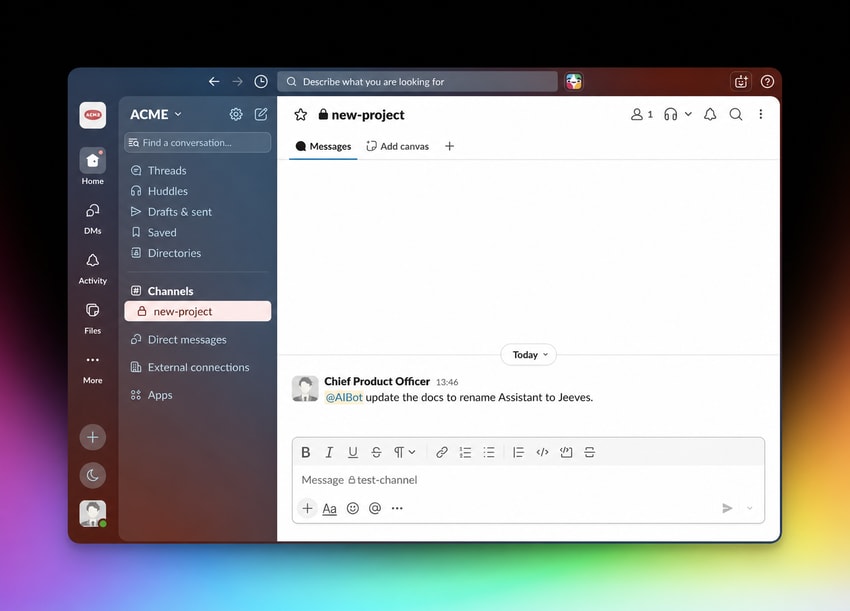
An unexpected contribution
@AIBot update the docs to rename Assistant to Jeeves
That Slack message came from the Chief Product Officer at a client I’d been working with for six months (I’ve changed the names, but not much else).
The Slack bot for the company’s AI platform found the documentation repo I’d just created in GitLab, tracked down references to the old product name across multiple pages, and opened a merge request with the changes.
The Product Design Lead reviewed the merge request, made a few copy tweaks, and merged it. The repo was only a few days old, and its first contribution from outside the design system team had already landed.
Why we built a new docs site
My team’s brief was, amongst other things, to help make the client’s design system “AI native”.
The codebase was large and complex. We’d need months to untangle it enough to make substantial changes. Sharing new agent skills outside the design system repo would also need to get past the security team (rightly so).
We wanted to ship something useful while we were still learning our way around the design system and its codebase, so we decided to focus on a new docs site. We saw it as a way to give consumers of the design system (agents and humans alike) one place to learn how to use it.
Teaching agents how to use a design system
A big part of making a design system AI native boils down to one question: “how can we teach an agent to use it?”
Agents are pretty smart. They’ll reach into node_modules and read the source code if they need to. So can humans, but I don’t know about you, I’d much rather read the docs.
And the source code only gets you so far. Design systems are all about composition. You can read the text input component and still be left wondering how you’re meant to put a form together. Guides for common patterns, and the thinking behind them, fill that gap, whether you’re a human or an agent.
We used Fumadocs to build the new site, which gave us most of the AI-friendly features we wanted out of the box. This included an llms.txt file to point agents to the right pages, and buttons to view or copy individual pages as Markdown so people could easily share them with an agent.
Every page could be copied or viewed as Markdown, and an llms.txt file helped agents find their way around.
Why the existing CMS wasn’t working for us
The existing documentation lived in a hosted CMS. It did the job, but it had a few problems.
Editing licences were relatively expensive, so only a handful of people had access. If something needed changing on the website, you probably had to ask someone else to do it, and that person was usually extremely busy. Not ideal.
We also couldn’t customise much. A WYSIWYG editor is perfectly fine for plenty of documentation sites, but we wanted more control over how ours worked. Building the site in code meant we could add the features we needed without working around the CMS or paying for features we weren’t using.
Moving the documentation into a repository would give us that flexibility, along with cheaper hosting and a more familiar development workflow.
There was an obvious downside, though. We’d be replacing a visual editor with code. Someone who previously needed a CMS account would now need to understand Git, clone a repository, set up their development environment and open a merge request.
We’d solve the cost and customisation problems, but potentially make the documentation even harder for people outside the engineering team to change.
Making Git a bit less intimidating
More and more of the company’s designers were using tools like Claude Code day to day. If they were comfortable doing that, it wouldn’t take much work to set up the repo so an agent could make the changes for them.
Most documentation changes would just be Markdown anyway. You shouldn’t need to understand the entire application to fix some copy or add a page.
We kept the project structure as simple as possible and wrote a getting-started guide. We also added an AGENTS.md file and skills to show agents how to write docs, add pages and register new MDX components.
An agent helped us write the skills, and they didn’t take long. The important part was deciding which instructions were actually useful, because bad skills can be worse than no skills at all.
The idea was that someone could clone the project, tell their agent what they wanted to change, and have it do most of the work. The human would still be driving, but wouldn’t necessarily need to write any code.
We also set up preview deployments for merge requests. That meant a designer could review the resulting page in a browser rather than having to make sense of a Git diff or run the site locally.
Changes still went through the design system team’s usual review. That added a step, but it also gave the team a chance to work with contributors before changes went live.
None of this required a particularly sophisticated AI setup. All we did was make a repo that was easy for people and coding agents to work in.
The integration we didn’t build
I’ve already spoiled this part, but we hadn’t expected the client to already have another way to edit the docs.
Their internal AI platform was connected to a lot of sources, including Slack and GitLab. It could access the organisation’s repositories and make changes to them.
Because we’d created the docs repo under the organisation’s GitLab, the platform could already find it. We didn’t have to configure anything or even tell the platform the repo existed.
A lot of design system knowledge gets worked out in Slack threads: someone asks when to use a tertiary button, a few people weigh in, and the answer stays buried in the thread. With the platform connected to both Slack and GitLab, someone could reply at the end of that thread with something like:
@AIBot summarise this thread and update the button docs with what we landed on
The AI platform could then open a merge request for the design system team to review, just like the rename.
Not everyone needs the same editor
I like that we didn’t have to replace the CMS with another editing interface.
Developers who were already comfortable working in their IDE could work directly in the repository. Designers could use Claude Code or another coding agent to help them make changes. And, as it turned out, someone could even make a request through Slack without knowing anything about the repository.
Every contribution came in as a merge request, so the design system team could review them all the same way.
Doesn’t need to know anything about Git, Markdown or how the site was built.
- A developer clones the repository, sets up their development environment, makes the change in their IDE and pushes it as a merge request.
- A designer clones the project and tells their coding agent what to change. The agent does most of the work, and the repository’s AGENTS.md file and skills explain how to work with it.
- Someone asks the company’s AI platform for the change in Slack. The platform finds the repository, makes the change and opens a merge request.
Every path ends the same way: a merge request with a preview deployment to check in a browser, a review by the design system team, then the merge.
Each path ends in the same merge request, preview and review, however much of the work the contributor did themselves.
We’d set the repository up for designers and developers using coding agents, so I didn’t expect its first outside contribution to come from the Chief Product Officer. Under the old CMS, they couldn’t edit the docs at all. A rename like this would probably have meant asking one of the few people with a licence, then waiting for them to find the time.
Git was the obvious downside of leaving the CMS. We worried it would make the docs even harder for people outside engineering to change, but now you don’t have to touch Git if you don’t want to. If you know what needs changing, you can propose it without ever leaving Slack.