


At Thinkmill, we’ve been helping design system teams adopt AI-assisted design and development. These days, a lot of that work centres around one key question: how do you set up an AI agent to produce something genuinely useful?
Most of what’s been written about AI focuses on shiny demos or big predictions. I wanted to know how teams are actually working today. I scoured the web and watched many hours of interviews with designers and engineers at Stripe, Shopify, Ramp, Atlassian and Intercom. Each participant walked through their design process now that AI is part of the mix.
I found that each team had invested in three key areas:
- Somewhere to prototype
- A way of providing AI with the right context
- The work of helping people adopt both
Here’s a quick snapshot of each team’s approach, based on publicly available information, at the time of publication:
- Atlassian uses off-the-shelf tools including Figma Make and Replit, alongside fine-tuned design system documentation.
- Intercom prototypes directly in their production codebase with Claude Code, Figma Code Connect and the Figma MCP server.
- Stripe built their own prototyping environment, Protodash, which runs in its own environment outside of production.
- Shopify uses an internal toolkit called Quick together with a playground that mirrors their admin interface.
- Ramp built a custom platform called Inspect to action bug fixes and customer feedback in production.
Somewhere to prototype
Diverging approaches
Two things distinguish the approach to prototyping amongst the five teams.
Hand-rolled vs off-the-shelf tools
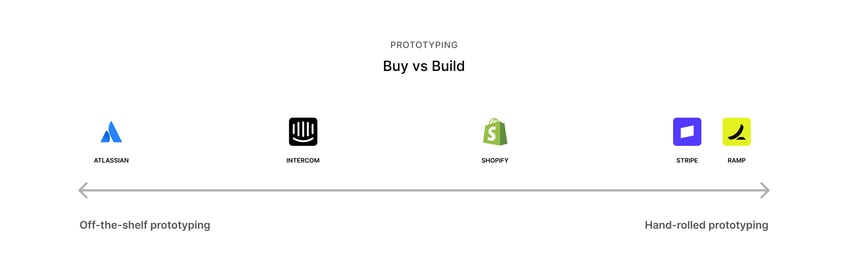
The first is whether a team rolled their own prototyping tool or reached for an existing one. Stripe and Ramp have invested in internal platforms. Atlassian leans more heavily on products such as Figma Make and Replit. Intercom and Shopify sit somewhere in the middle, with their own workflows and integrations.

Sandboxed vs wired to production
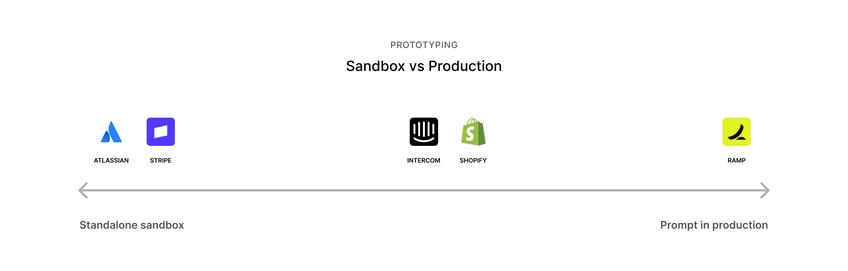
The second is how close the prototype is to production. Stripe appears to keep Protodash isolated in a sandbox, but builds it from the real design system, so what a designer ships in a review is the same code an engineer can pick up. Ramp goes even further and prototypes directly on a branch of production. Both approaches result in a prototype real enough for people to trust it.

Converging features
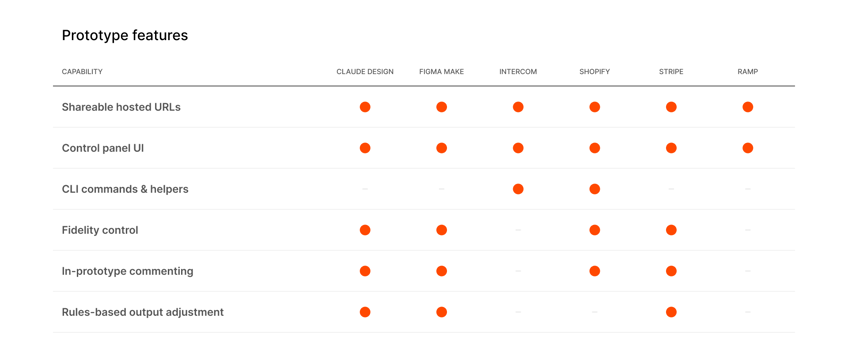
Despite these diverging approaches to prototype setups, many teams and tools are converging on similar features. Features which all work to make design conversations easier, help people align earlier, and explore ideas quickly.
Shareable, hosted URLs and CLI commands & helpers
All five teams have created a safe space for designers to store and share prototypes. This enables anyone in the org to view a prototype in their browser without installing anything or setting up a local environment.
Intercom and Shopify have optimised the prototype publising process by providing CLI commands to prototype creators.
Control panel UI
Another common feature was a UI panel to control application state. This lets prototype creators and reviewers switch between empty and populated states, test with messy data, preview a different language, or see how the interface behaves for a startup compared to an enterprise customer, without rebuilding the prototype. That makes the prototype more useful because it can quickly test the robustness of the design against common user scenarios.
Fidelity control and rules-based output adjustment
Stripe and Shopify deliberately signal when work is unfinished. Early concepts are shown in greyscale or using off-brand UI components so reviewers naturally treat them as early prototypes rather than polished ready-to-ship designs.
In prototype comments
To help facilitate design review, Stripe and Shopify both built commenting directly into the prototype. AI summarises the feedback, then acts on the requested changes. Atlassian leverages similar features with Figma Make.

Each one of these ideas removes a little friction from the design prototyping process.
Context is what makes the difference
[An LLM] will just imagine the entire design system without telling you when it’s not there. – Owen Williams, Stripe Engineer
If the prototyping environment is where the work happens, context is what determines the quality of the result.
This was the strongest pattern across the five teams. The quality of the AI-generated work depended on the quality of the information it was given. Each team had invested in providing context across the design system, the project, and the customer.
Design system context
Design system context is where most of the effort has gone, and for good reason. The challenge is hallucination. As Stripe’s Owen Williams put it, an LLM “will just imagine the entire design system without telling you when it’s not there.” The output often looks believable, even when it’s built on components that don’t exist. The trap is that the work looks complete, so teams start building on it, then hit the gap when someone tries to ship the real thing and the component isn't there or it doesn't work that way.
Several teams had run into the same limitation. Design tokens translate reasonably well to AI tools. Composing real components is much harder.
Atlassian generates instruction files directly from their component packages, but only exposes a carefully selected subset to the model. They narrow it down to 20 to 30 components with clear examples for each. More context, they found, often produced worse results. They also built a “translating from Tailwind” table for every component. Since language models have seen so much Tailwind and React, Atlassian lets the model think in familiar terms before mapping those concepts back to the correct design system components.
Intercom uses Figma Code Connect across their component library. Instead of recreating components from scratch, the AI receives the real import paths from the production codebase and works with what’s already there.
Stripe exposes their design system through an MCP server and requires the AI to query it before writing any code. Just as importantly, it defines what should happen if that server isn’t available, so the model fails honestly instead of confidently inventing an answer.
The principle behind each of these approaches is consistent. AI performs better when it can rely on a trusted source of truth rather than trying to fill in the gaps itself. My colleague Joe Prisk explored this in his article, Why your design system is the most important input to Claude Code. Despite coming from different directions, each of these teams leveraged their existing design system as context for their AI prototyping tools.
Project context
Project context is much simpler. It’s the brief, the requirements and the background to the work. Stripe’s designers paste a product requirements document directly from Google Docs into their prototype. Some Shopify designers keep a small collection of markdown files alongside each project so the model starts with the right context before generating anything.
Customer context
At Ramp, designers begin by understanding what customers are experiencing. They review session recordings in LogRocket, use internal tools that summarise where people struggle, and query research transcripts with Notion AI. Those insights shape both the prototype and the prompts that generate it.
Most of that work is still manual. Designers read the research, identify the patterns and bring those insights into the prototyping process themselves.
The same discipline that’s emerging around design systems and project context can also be applied to customer understanding. As these workflows mature, AI won’t just have better information about how an interface should be built. It’ll have better information about the people it’s being designed for.
Supporting adoption
The least visible part of these workflows may be the most important.
Design teams bring together people with very different technical backgrounds. Some designers have never opened a code editor, while others are comfortable working in Git and the command line. Even small hurdles, like setting up permissions, installing tools, or deploying a prototype, can stop someone before they get to the work itself. The teams I observed don’t treat this as an afterthought. They invest in training just as deliberately as they invest in tooling.
At Shopify, AI adoption accelerated after its CEO, Tobi Lütke, set the expectation that using AI would become part of how people work and how performance is assessed. Intercom’s push came from its CTO and design leadership. Atlassian ran a company-wide “AI Builder Week” where, by their account, thousands of employees paused their usual work for a week to learn AI prototyping.
The strongest adopters also made it easy for people to learn from each other. Intercom created a Prototyping Hub with practical resources, including a plain-language “Code 101 for designers” guide and step-by-step videos. Shopify maintains an internal gallery of prototypes alongside a shared library of prompts that others can reuse. Atlassian even discovered that inviting people into a Slack channel wasn’t particularly effective, while sending a group direct message prompted much stronger engagement. They built a small bot around that insight.
The broader lesson is that the investment in tools and the investment in people need to move together. A sophisticated prototyping environment isn’t much use if only a handful of people feel confident enough to use it.
What to get right first
The teams making the fastest progress had one thing in common; they already had a strong design system before AI entered the workflow. A design system has always been about making one team’s decisions clear and reusable for everyone else. Tokens, components, documentation, and guidance exist to help people build consistently. We’ve been doing that work for well over a decade. AI agents are just another audience for the same clarity. If you’re exploring what this means for your own team, we’re always happy to talk it through.