
Navigation

  • Client impact
  • Writing

AI Solutions

  • AI Systems
  • AI Development

Software teams

  • Design Systems
  • Product Design & Engineering
  • API Platforms
  • View all services for software teams
Get in touch
  • AI Systems

    Model-agnostic AI systems and agents that do real work

    AI Development

    Custom apps and tools built with AI-enabled engineering

  • Design Systems

    Depth of experience that few can match

    Product Design & Engineering

    Experts in cross-functional collaboration

    API Platforms

    Node.js, React, & GraphQL at scale


    View all services for software teams
  • Client impact
  • Writing
  • Contact

Method / Playbook · 1 min read

Route mapping

Route mapping is a process of co-designing a project‘s URL schema (and more) to define the UX and IA of a site or app.

Prep time: 15 minutes · Duration: 1-3 hours · Participants: 1-3

Introduction

Route mapping is an activity that generates a lightweight URL schema of an app or website experience. We like to think of it as a UX blueprinting exercise in service to interface prototyping, application scaffolding, mock APIs, and stakeholder alignment (who can more easily picture the product and refine the ambition and scope with an artefact such as this).

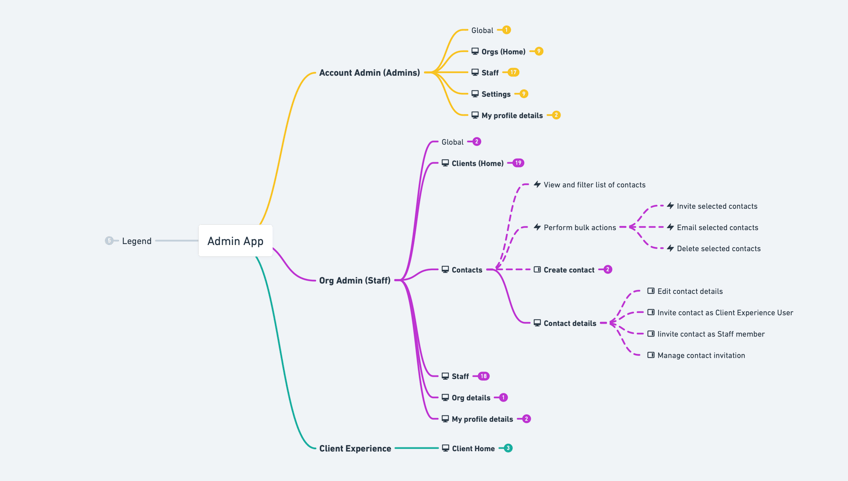
A route map created in WhimsicalA route map created in Whimsical

A route map created in Whimsical

Participants

Route mapping is a cross-functional affair at Thinkmill. A UX Designer typically covers the elements that would exist in a traditional IA artefact, but route maps also outline concerns like CRUD related user activities and API fundamentals, so including engineers in the activity generates the best outcomes.

The difference between a route map and a typical IA diagram

Our view is that defining an IA is a process best informed by synthesising multiple takes on a problem – conceptual, route-based, flow-based, etc. We’ve found that route maps let cross functional teams cover more surface area and detail in faster time. There are certainly instances where a standalone traditional IA artefact may also be worth creating, but we start from the route map first, and expand as required.

How to map routes

For a more detailed breakdown on how to setup a route map document see our article Route Map - a lightweight schema for defining a UX blueprint.

Chat to the following people to learn more about this play:

Boris Bozic avatarBoris Bozic avatar
Boris Bozic

Co-founder and Head of Design at Thinkmill. Product designer. Swimmer. Runner.

Get playbook updates

For updates on future playbook publications, subscribe to our newsletter.

Related plays

  • Mock API

    Mock APIs imitate a real API by providing a realistic mock data response upon request. It’s useful during development and testing when live data is either unavailable or unreliable

    October 2024·3 min read
  • Process mapping

    Process mapping surfaces the movement of information and user interaction throughout a system in the form of a flowchart. It captures assumptions or current-state realities related to how the system works, and helps expedite alignment, design, and development,

    October 2024·2 min read
  • User journey mapping

    User journey mapping captures the steps a user takes to complete a specific task in the form of a flowchart. It surfaces assumptions about how the team expects a user to interact with the product, and highlights pain points and areas for improvement.

    October 2024·3 min read
  • Activity Mapping

    Activity mapping is a way to dynamically capture, and work on, product requirements in a format that’s more useful than a static document.

    October 2024·3 min read

We’d love to work with you

Get in touch

Footer

Thinkmill is a member of the Tech Council of Australia(opens in new tab).

AI Solutions

  • AI Systems
  • AI Development

Software teams

  • Design Systems
  • Product Design & Engineering
  • API Platforms
  • View all software teams

Client impact

  • ELMO
  • Tiimely
  • Atlassian
  • Reckon
  • AnywhereWorks
  • View all client impact

Open Source

  • Keystone (opens in new tab)
  • Keystatic (opens in new tab)
  • React Select (opens in new tab)
  • Classnames (opens in new tab)
  • Manypkg (opens in new tab)
  • Changesets (opens in new tab)